
Rust —— Hello, World!

Hello World!

Rust是一门静态编译的语言,强调性能类型安全并发性

1. 安装 Rust

1
2
3
4
5
6
7
8
# Rust 安装
curl --proto '=https' --tlsv1.2 -sSf https://sh.rustup.rs | sh

# 加载环境变量
. "$HOME/.cargo/env"

# 验证安装
rustc --version

其他常用命令

1
2
3
4
5
6
7
8
# Rust 更新
rustup update

# Rust 卸载
rustup self uninstall

# Rust 离线文档
rustup doc

2. VS Code 插件拓展

  • rust-analyzer —— 代码补全与分析
  • Dependi —— Cargo.toml 依赖管理助手
  • Even Better TOML —— TOML 高亮与校验
  • CodeLLDB —— Rust Debugger

3. Hello,World

1
2
3
4
5
6
7
8
9
10
# 创建项目目录
mkdir hello_world
cd hello_world/

# 新建 main.rs
cat > ./main.rs << 'EOF'
fn main() {
println!("Hello, world!");
}
EOF
1
2
3
4
5
# 编译
rustc main.rs

# 执行
./main

执行后 Hello, world! 字符串应打印到终端

Troubleshooting

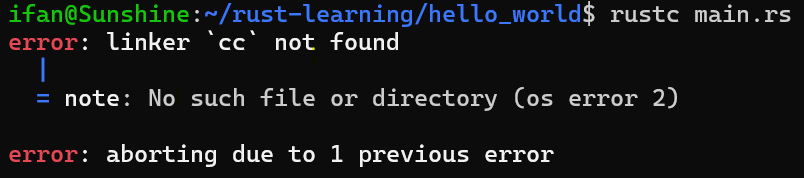
编译时报错 linker 'cc' not found,说明系统缺少编译工具,安装即可:
1
2
3
4
5
# 更新软件包索引
sudo apt update

# 安装构建工具
sudo apt install build-essential -y

4. Hello, Cargo

Cargo 是 Rust 的官方构建工具和包管理器,提供 项目管理、依赖管理、编译、测试 等功能。

1
2
3
4
5
6
7
8
9
10
11
12
13
# 初始化项目
cargo new hello_cargo
cd hello_cargo

# 编辑 src/main.rs
cat > ./src/main.rs << 'EOF'
fn main() {
println!("Hello, cargo!");
}
EOF

# 构建并运行(等价于 cargo build + 执行)
cargo run

其他常用命令

1
2
3
4
5
6
7
8
# Debug 构建
cargo build

# Release 构建
cargo build —release

# 查看 Cargo 版本
cargo --version

Hooray! Rust 学习之旅,正式启程!!!
